Stages, board and table
Move deals through six fixed stages on a drag-and-drop board or a sortable table, and record passes cleanly.
The pipeline is where a company becomes a deal and moves toward a decision. Deals are shared firm-wide, so everyone sees the same board.
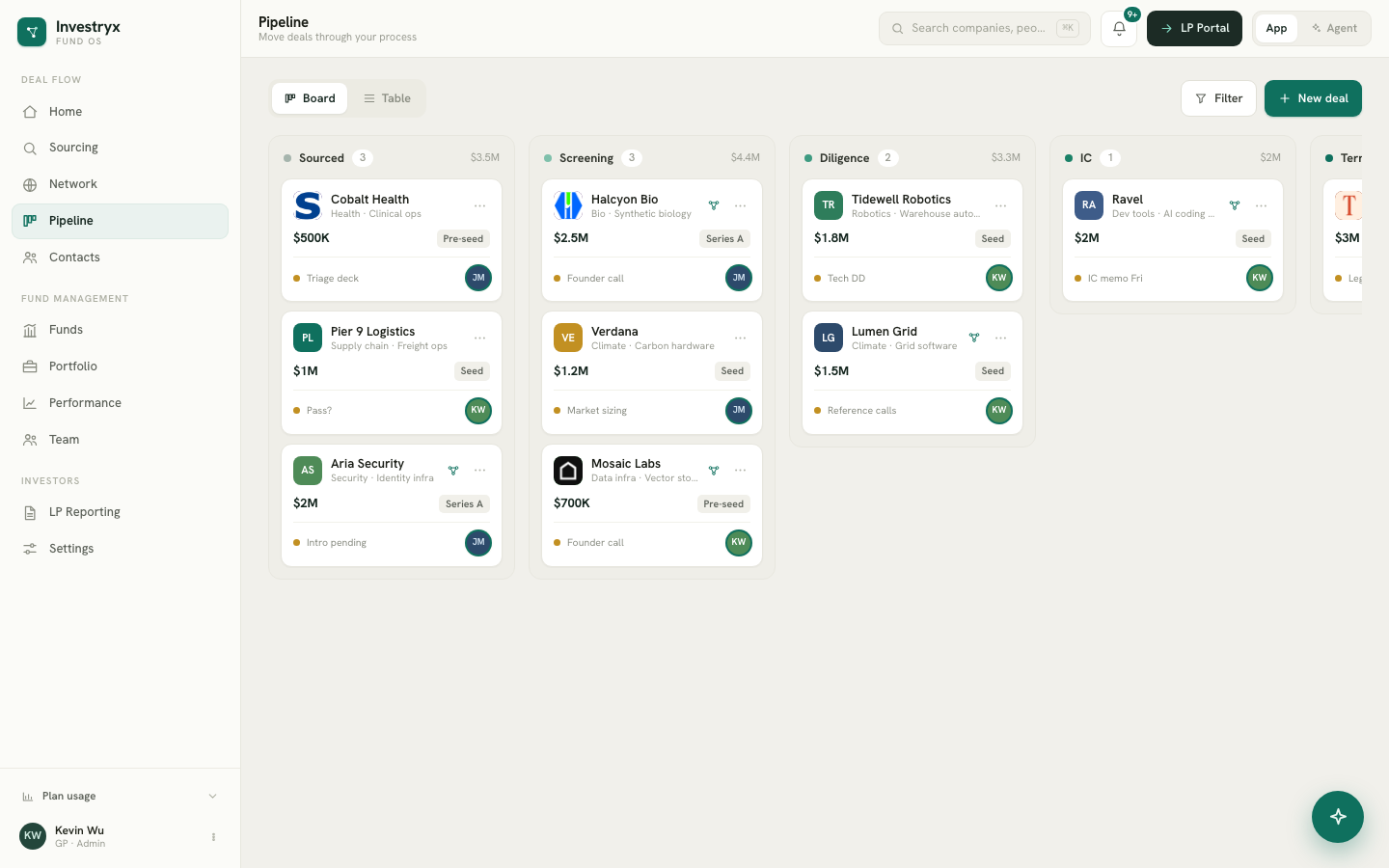
The six stages
Every deal is in exactly one stage, in this order:
Sourced → Screening → Diligence → IC → Term Sheet → Closed
Stages are fixed; you cannot rename or add them. Moving a deal to Closed records the investment and creates the portfolio position (see Recording an investment).
Create a deal
There are two routes:
- From a startup’s detail drawer, select Add to pipeline.
- On Pipeline, select New deal. Pick a company already in your network, or choose Create new company and enter the Company name and Website. Set the Lead (PIC) and any Supporting team members, then select Create company & deal.
New deals start at Sourced. A company can have only one active deal at a time; adding it again opens the existing one.
Board view
Board is the default view. Each column is a stage; the header shows the number of deals and their summed target amount. A card shows the company, its sector, the target check, the round, the next step, the deal team’s avatars and a warm-intro indicator when one exists.
- Drag a card to another column to change its stage. On a phone, use Move to stage… on the card instead.
- Select a card to open the company drawer, where the deal card, diligence checklist and memo live.
- Empty columns read “No deals here — drag a card in.”
Table view
Switch to Table for a flat list with the columns Deal, Stage, Amount, Valuation, Owner and Next step. Filter chips above the table show Active, Passed or All deals.
Passing on a deal
- Open the deal (select its card) and, on the deal card at the top of the drawer, select Pass.
- In Pass on Acme Robotics, tick one or more Reasons. They are grouped as Team, Market, Traction, Economics, Deal and Fit — for example “Founder concerns”, “TAM too small”, “Valuation too high” or “No warm path”.
- Add a Note for the team if useful, then select Mark as passed.
Passed deals leave the stage columns. On the board, a Passed · N button reveals them in a faded column; each card has Reopen, which returns the deal to the stage it was in. The pass reasons stay on the deal and are searchable later, so your reasons for saying no become data.
Deal team
The Lead (PIC) owns the deal and appears as its owner; Supporting members can view, add notes and receive updates. Change the team at any time with Assign on the deal card.